
Which subscriptions can your ChatGPT or Claude plan actually replace?
Category by category: which app subscriptions a ChatGPT Plus or Claude Pro plan can replace, which to keep because chat doesn't keep your data, and why.
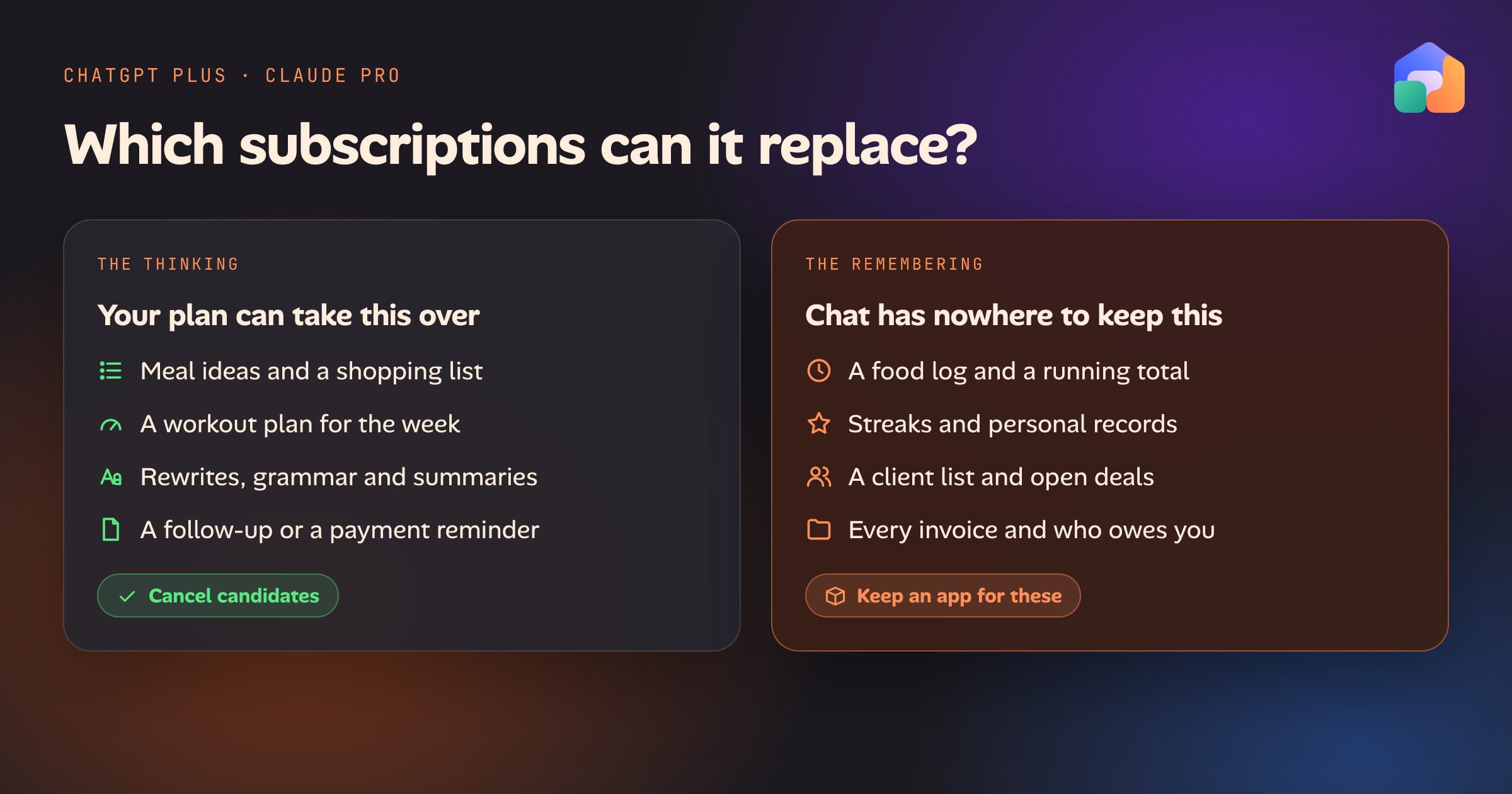
If you already pay for ChatGPT Plus or Claude Pro, it is fair to ask which of your other subscriptions that plan makes redundant. Search for the question and most results explain how to cancel ChatGPT itself. This post answers the question that was asked, category by category, as of October 2026.
The short version: a chat plan can replace the thinking part of many apps, but not the part that remembers. It will suggest a meal, plan a workout, fix a paragraph or draft a follow-up. It has nowhere reliable to keep your food log, your streaks, your to-do list or your client list. So you can cancel the apps you only use for ideas and drafts, and you should keep the apps that hold a record you would miss, unless you move that record somewhere else that keeps it.
The answer at a glance
| Subscription | What the plan replaces | What it can’t do alone | On a chat plan alone |
|---|---|---|---|
| Writing tools | Grammar, rewrites, tone, summaries, first drafts | Correct you inline in every app you type in | Cancel, for most people |
| Meal planning | Meal ideas, a week’s plan, a one-off shopping list | Remember your saved recipes and what you cooked last week | Cancel if you only want ideas |
| Workout plans | A program for your goal, schedule and equipment | Log your sets and build next week on this one | Cancel the plan generator, keep the log |
| Calorie counting | An estimate for a meal you describe or photograph | A daily log, a running total, a target, trends | Keep an app |
| Habit tracking | Designing a habit and talking through why it slipped | Keep the streak and remind you unprompted | Keep an app |
| To-dos | Breaking a project into steps, prioritizing a list you paste in | Hold the list, due dates and shared lists | Keep an app |
| CRM | Drafting a follow-up from notes you paste in | Remember every contact, deal and who is waiting | Keep an app |
| Invoicing | Wording an invoice or a payment reminder | Number, store and track invoices and payments | Keep an app |
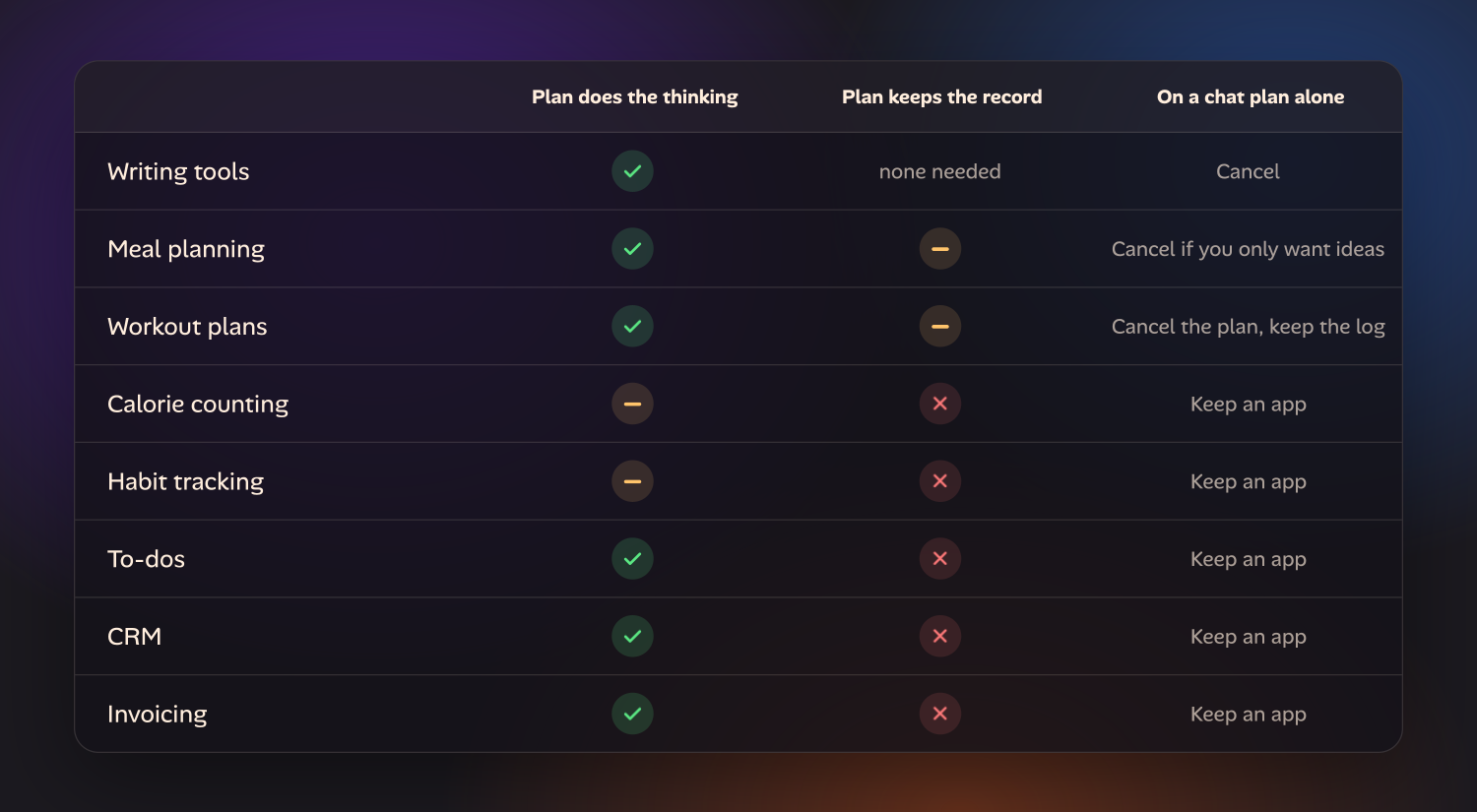
Why the line falls where it does
Both plans remember some things. ChatGPT has saved memories and can refer back to past chats. Claude builds memory entries as you talk and keeps a separate memory for each Project. These hold facts and preferences: you’re vegetarian, you train three days a week, your business invoices on the 1st.
A tracker is a different thing. It is a table of dated entries: 412 meals, 60 days of a streak, 38 invoices. You need to add those up, filter them, correct one and export them. Chat memory is not built for that, and neither product claims it is. You can keep a log going inside one long conversation or a file in a Project, and for a week it works. Then you are the database: you paste yesterday’s total back in, and one missed paste makes every number after it wrong.
The pages that rank for “ChatGPT calorie tracking” say the same thing. Nutrola, which sells a calorie app, puts it bluntly: you can’t ask how many calories you’ve eaten today and get an accurate answer unless every item was logged in the same conversation. CalNote, another tracker, calls ChatGPT a capable reasoning engine that still doesn’t remember your breakfast when you ask about dinner unless you restate the running total. Both companies have an app to sell, so read them with that in mind, but the limitation they describe is real and easy to check for yourself.
Writing tools: cancel, for most people
This is the strongest case for cancelling. Grammar checking, rewriting for tone, shortening, paraphrasing, summarizing and first drafts are exactly what a chat plan is for, and there is no record to lose: each piece of text stands on its own.
Keep the tool if you rely on corrections appearing inline wherever you type, such as in your email client and every web form, or if you need something a chat doesn’t do, like a plagiarism check against published sources or a shared style guide enforced across a team. Pasting text into a chat window is a different habit from being corrected as you write, and for some people that is the whole value.
Meal planning: cancel if you only want ideas
Ask either assistant for a week of dinners for four, under 40 minutes each, with no mushrooms, and you get a usable plan and a shopping list grouped by aisle. If that is all your meal-planning subscription does for you, the plan you already pay for covers it.
What chat forgets: your own recipes, what you made last week, and what’s already in the cupboard. Each new conversation starts from your preferences, not from your recipe box. You can paste recipes in, or keep them in a Project, but the shopping list is a one-off: it doesn’t merge with the list your partner is adding to, and it doesn’t tick off in the shop.
Keep the app if you cook from a saved collection, or share one grocery list with your household.
Workout plans: cancel the plan, keep the log
A training program for your goal, your schedule and the equipment you have is a thinking job, and a chat plan does it well. It will also explain an exercise, swap one you can’t do, and adjust the week when you tell it your knee hurts.
What chat forgets: what you actually lifted. Progression depends on last week’s sets, reps and weights, and a personal record only exists if something recorded the previous best. Without a log, “add a little each week” turns into guessing.
Keep the app if you track sets, or follow a program that adjusts to your numbers. If you pay separately for a plan generator and a log, the plan generator is the one to cancel.
Calorie counting: keep an app
A chat can estimate a meal from a description, and from a photo, though photo estimates can be far off because portion size is hard to judge from a picture. For a one-off “roughly how much is this?”, it is quick and good enough.
What chat forgets: everything that makes counting useful. A daily log, a running total, a target, and the trend over weeks. This is the category where the gap is most obvious, which is why the calorie apps themselves write about it.
The apps are also moving into the chat. MyFitnessPal has had an app inside ChatGPT Health since January 2026, which answers nutrition questions from its food database. That is useful, but it is the subscription and the chat plan working together, not one replacing the other.
Keep the app, or replace it with another app that keeps the log. Chat on its own is not a substitute. The guide to using ChatGPT or Claude as a calorie counter has the prompts that estimate well, the accuracy research and the apps to pair them with.
Habit tracking: keep an app
A chat is good at the part of habits that happens before and after the tracking: picking one that’s small enough, deciding when it fits in your day, and working out why it stopped. That is real value, and no tracker does it well.
What chat forgets: the streak. A habit tracker is a row of dated ticks and a reminder that arrives without you asking. A conversation you have to open and update by hand is one more habit to keep. ChatGPT can run a scheduled prompt, which covers the reminder, but not the record.
Keep the app. Many good habit trackers are free or a one-time purchase, so this may not be a subscription worth chasing anyway.
To-dos: keep an app
Planning is a thinking job: break a project into steps, order them, estimate them, decide what to drop. Paste in a messy list and either assistant will hand back a better one.
What chat forgets: the list. A to-do app is where the tasks live between planning sessions, with due dates, recurring items, a widget on your phone and a list you share with someone else. Both plans can connect to some outside tools, so the assistant may be able to read and add to the list you already keep. That makes your existing app more useful. It doesn’t replace it.
Keep the app.
CRM: keep an app
Give a chat your notes from a call and it will write the follow-up, summarize where a deal stands, or suggest what to ask next. For a freelancer with five clients, that plus a spreadsheet may be all the CRM you need, and that is an honest reason to cancel one.
What chat forgets: who you spoke to, when, and who is still waiting to hear from you. The value of a CRM is that it holds the whole pipeline when you aren’t looking at it. A chat only knows what you paste in today.
Keep the app once you have more contacts than you can hold in your head.
Invoicing: keep an app
A chat will word an invoice, a late-payment reminder or a polite third reminder. It can turn a description of the work into line items.
What chat forgets: invoice numbers in sequence, what was sent, what was paid, and what is overdue. Those are financial records you may have to produce later, for your accountant or for tax. They belong in something that stores them.
Here too the incumbents are meeting the assistants halfway. Intuit’s QuickBooks connector for Claude and its ChatGPT plugin gained the ability to create and send invoices in July 2026. You still need the QuickBooks subscription, because that is where the records live. The chat becomes a faster way to use it.
Keep the app.
What about people who cancelled everything?
In July 2026, Pieter Levels wrote that he had cancelled all his SaaS subscriptions and vibecoded replacements himself. It is a real trend and worth reading, but read what he did. He is an experienced developer who built his own software with AI coding tools, and he says he still pays for domains, server hosting, storage and AI APIs. His replacements are apps that run on servers and keep their data in databases.
That supports the argument here. He didn’t replace his subscriptions with a chat window. He replaced them with apps that keep the data, built by AI. The remembering still happens in an app.
What closes the gap: an app that keeps the record, plus your AI
For every “keep” above, the fix has the same shape. Something stores the record, and your AI plan works on it.
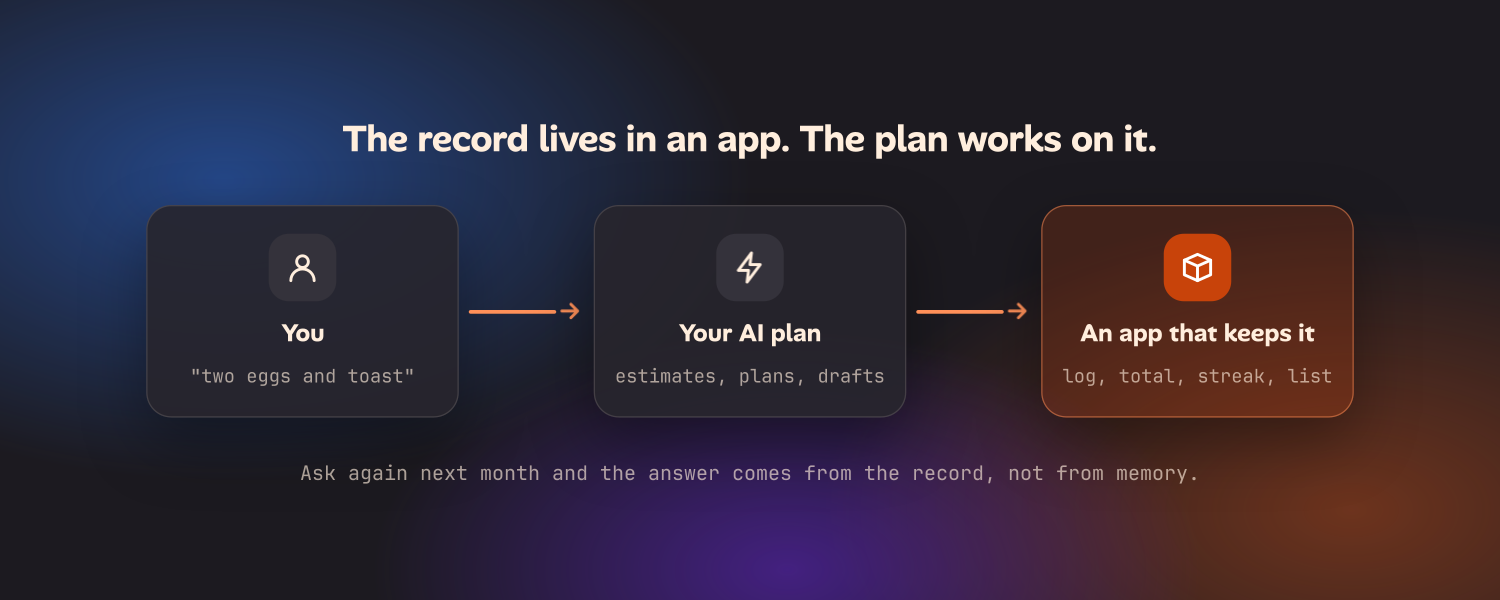
There are a few ways to get there, and they suit different people:
- Keep the app you have and connect it. If your calorie counter or accounting tool has an app or connector for ChatGPT or Claude, you get the best of both. You keep paying for it.
- Switch to a free or one-time-purchase app. For habits, to-dos and workout logs especially, good ones exist. You lose the AI part unless you copy data across by hand.
- Build your own with a coding agent. Both plans include one: Claude Code with Claude, Codex with ChatGPT. This is the Levels route. It works, and it leaves you to host the app, back it up and fix it.
- Use apps that are built to run on your own AI plan. This is what we are building with Oikou. At launch, Oikou’s Catalogue has an open-source app for each of the “keep” jobs in this post: a calorie counter, a meal planner with a grocery list, a workout log, a habit tracker, a to-do list, a CRM and invoicing. They run on a Mac or Linux computer you own that stays on, they keep the data there, and the AI part is powered by the Claude or ChatGPT plan you already pay for (its usage limits apply). The apps add no subscriptions of their own. There is no Oikou app for writing tools, because that is the one category where chat alone already does the job.
Oikou Host is free to run yourself. It needs a computer that stays on, and it is one way to close the gap, not the only one. If it sounds like the one you want, the page for people replacing subscriptions goes through it job by job, the apps page lists every app, and the comparison page sets Oikou next to chat agents and subscription apps.
Is a ChatGPT or Claude plan worth it for replacing apps?
On its own, it is worth it for the thinking apps. If you pay for a grammar tool, a meal-idea app and a workout plan generator, one chat plan covers all three, and does a good deal more besides.
It does not, on its own, justify cancelling the apps that keep your records. Cancel a calorie counter for a chat window and within a fortnight you will either stop counting or re-subscribe.
The plan becomes worth more when it has records to work with. Then the same plan that writes your emails can also log lunch, move tomorrow’s calorie target and draft the reminder for the invoice that is ten days late. Whether that is through connectors to the apps you keep, or through apps that run on your own computer, the rule is the same: let the plan think, and give it somewhere to remember.
Before you cancel anything, check two things. Export your data first, since a food log or a client list is hard to rebuild. And check your plan’s usage limits: both providers cap how much you can use in a given window, and those limits apply to everything you do with the plan, including coding agents and apps that run on it.
Questions
- Which subscriptions can I cancel if I have ChatGPT Plus or Claude Pro?
- The ones where you only pay for thinking: writing and grammar tools, meal idea generators, workout plan generators and summarizers. Keep the ones that remember things for you, like a food log, streaks, a to-do list, a client list or invoices, unless you move that data into another app that keeps it.
- What apps can you replace with ChatGPT or Claude?
- Apps whose whole job is producing text or a plan from what you tell them: grammar and rewriting tools, paraphrasers, summarizers, recipe and meal idea generators, and workout plan generators. Apps that store a growing record, such as calorie counters, habit trackers, to-do apps, CRMs and invoicing, are not replaced by chat alone.
- Can ChatGPT or Claude replace a calorie counter?
- Not on its own. A chat can estimate a meal from a description or a photo, but it doesn't keep a reliable daily log, a running total or a target, and photo estimates can be far off. What works is an app that keeps the log, with an AI doing the tedious part.
- Does ChatGPT or Claude memory work as a tracker?
- No. Memory in both products holds facts and preferences about you, such as that you are vegetarian or training for a race. It is not a table of dated entries you can add up, filter or export, so it can't stand in for a food log, a streak or a list of invoices.
- Is ChatGPT Plus or Claude Pro worth it to replace other apps?
- It is worth it if the plan does work you would otherwise pay other apps for. On its own that means the thinking apps: writing help, meal ideas, workout plans. It covers more once it is paired with apps that keep your data, because the same plan can then plan, log and draft across all of them.
- What closes the gap between a chat plan and a tracking app?
- An app that keeps the record, with your AI plan working on it. That can be the app you already pay for with an AI connector, a free or self-hosted app, or a set like Oikou's, whose open-source web apps run on your own computer and use the Claude or ChatGPT plan you already pay for (its usage limits apply).